Video Live Wallpaper Maker
ZipoApps
Advertisement
-
Installs
10M+
-
Developer
ZipoApps
-
Category
Productivity
-
Content Rating
Rated for 3+
-
Developer Email
-
Privacy Policy
https://zipoapps.com/videowallpaper/privacy
Advertisement
Screenshots
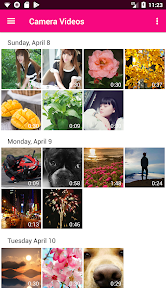
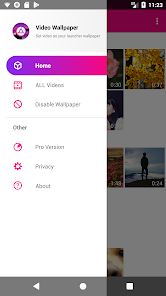


editor reviews
Video Live Wallpaper Maker by ZipoApps is a specialized tool designed to transform your favorite videos into dynamic, animated backgrounds for your Android device's home and lock screens. The app's core purpose is to move beyond static images, allowing users to personalize their devices with moving memories, cinematic clips, or any video file they possess. It directly addresses the desire for deeper personalization and a more engaging visual interface on smartphones and tablets.
This app is ideal for users who find standard wallpapers boring and want their device to reflect their personality more vividly. Whether you have a short clip from a vacation, a scene from a beloved movie, a mesmerizing looped animation, or a video of a pet, this app provides the means to make it your background. It solves the problem of limited personalization options by leveraging the user's own video library.
In practice, the core feature of converting videos to wallpapers works reliably. The process is straightforward: select a video, trim it to the desired segment, set the playback style (like loop or play once), and apply it. The app handled various video formats I tested without significant issues. Additional features, such as adjusting playback speed and setting a static preview image, add practical value by offering more control over the final look. In my usage, I successfully set a short, looped clip of a mountain sunset as my lock screen. It performed smoothly, with no noticeable battery drain during my testing period, and it genuinely made unlocking my phone a more pleasant experience.
I would recommend Video Live Wallpaper Maker to Android enthusiasts, content creators, and anyone who views their phone as a personal canvas. It is most useful for users who have specific video clips they are emotionally attached to and want to see them daily. It's also a great tool for those who enjoy customizing their tech to stand out, making their device interface uniquely theirs.
features
- 🎬 Core Video-to-Wallpaper Conversion: Easily turn any video from your gallery into a live wallpaper for your home or lock screen with a simple selection and trim interface.
- 🎬 Customization Controls: Fine-tune your wallpaper with options to loop the video, play it once, adjust playback speed, and select a specific thumbnail to represent it in settings.
- 🎬 Performance Optimization: Includes settings to manage battery usage and performance, such as pausing playback when the screen is off or in certain apps.
- 🎬 Direct Sharing & Community: Create and export your live wallpapers to share with others, and browse a community section to download wallpapers made by fellow users.
pros
- 👍 User-Friendly Process: The setup is intuitive and quick, requiring no technical expertise to get a live wallpaper running.
- 👍 Good Format Support: Successfully processed several common video file types from my device without needing prior conversion.
- 👍 Effective Core Function: It reliably performs its primary task of creating stable, animated wallpapers that work as intended.
- 👍 Lightweight Feel: The app itself is not bloated and focuses on its main features without unnecessary complexity.
cons
- ⚠️ Occasional Performance Hiccups: On older or less powerful devices, some high-resolution videos can cause slight stuttering or increased battery consumption.
- ⚠️ Basic Editing Suite: The trimming and editing tools are functional but quite basic; users looking for advanced video editing within the app will be disappointed.
- ⚠️ Ad-Supported Model: The free version contains advertisements, which can be intrusive during the setup and browsing process.
- ⚠️ Inconsistent Preview: The preview window within the app sometimes doesn't perfectly match the final look on the actual home screen, requiring a bit of trial and error.
Recommended Apps
-
![]()
SiriusXM: Music, Sports & News
Sirius XM Radio Inc4.8


-
![]()
Video Call from Killer Clown -
Dualverse, Inc.3.6
-
![]()
Fun Fact- My Personal Fact
Andromeda App3.8
-
![]()
Galaxy Tarot
Galaxy Tone Software4.3 -
![]()
Pixelup - AI Photo Enhancer
Codeway Dijital3.9
-
![]()
Club Cooee - 3D Avatar Chat
cooee GmbH3.6
-
![]()
Daily Horoscope & Astrology
TELEMAQUE4.2 -
![]()
What Type of Girl Are You?
BuzzForFun0 -
![]()
Skype for Business for Android
Microsoft Corporation4.1 -
![]()
Ghost Detector Radar Simulator
First Class Media B.V.3.8
-
![]()
Walloop - Live Wallpapers
Walloop4.5
-
![]()
Nebula: Horoscope & Astrology
OBRIO3.5
-
![]()
Who were you in past life? Tes
Hemisoft2.6
-
![]()
FalFal: Astrology, Tarot, Love
FalFal Team4.8
-
![]()
Broken Screen Prank
HappySpark4.5












Hot Apps
-
![]()
Netflix
Netflix, Inc.3.9
-
![]()
Google Gemini
Google LLC4.6
-
![]()
Passport Parking
Passport Labs, Inc.3.4 -
![]()
Google Maps
Google LLC4.2 -
![]()
ParkMobile: Park. Pay. Go.
Parkmobile, LLC4.6
-
![]()
Geeni
Merkury Innovations4.6
-
![]()
TikTok
TikTok Pte. Ltd.4.4 -
![]()
Klarna | Shop now. Pay later.
Klarna Bank AB (publ)4.3 -
![]()
letgo: Buy & Sell Used Stuff
letgo3.3 -
![]()
FaceApp: Perfect Face Editor
FaceApp Technology Ltd4.4 -
![]()
GroupMe
GroupMe4.5
-
![]()
Microsoft Copilot
Microsoft Corporation4.8
-
![]()
Hulu: Stream TV shows & movies
Disney4.5
-
![]()
WhatsApp Messenger
WhatsApp LLC4.4 -
![]()
Pandora - Music & Podcasts
Pandora4.1 -
![]()
TikTok - Videos, Shop & LIVE
TikTok Pte. Ltd.4.1 -
![]()
DoorDash - Food Delivery
DoorDash4.6
-
![]()
Grok
xAI4.9
-
![]()
DeepSeek - AI Assistant
DeepSeek4.2 -
![]()
Direct Express®
i2c Inc.4.3 -
![]()
Signal Private Messenger
Signal Foundation4.5
-
![]()
Chai: Chat AI Platform
Chai Research Corp.4.3 -
![]()
Uber Eats: Food Delivery
Uber Technologies, Inc.4.6
-
![]()
Perplexity - Ask Anything
PerplexityAI4.7
-
![]()
OfferUp: Buy. Sell. Letgo.
OfferUp Inc.4.4 -
![]()
Wise: International Transfers
Wise Payments Ltd.4.7
-
![]()
SiriusXM: Music, Sports & News
Sirius XM Radio Inc4.8
-
![]()
Cash App
Block, Inc.4.6
-
![]()
Uber - Request a ride
Uber Technologies, Inc.4.5
-
![]()
Sora by OpenAI
OpenAI4.7





























Disclaimer
1.Game.playnovapro does not represent any developer, nor is it the developer of any App or game.
2.Game.playnovapro provide custom reviews of Apps written by our own reviewers, and detailed information of these Apps, such as developer contacts, ratings and screenshots.
3.All trademarks, registered trademarks, product names and company names or logos appearing on the site are the property of their respective owners.
4. Game.playnovapro abides by the federal Digital Millennium Copyright Act (DMCA) by responding to notices of alleged infringement that complies with the DMCA and other applicable laws.
5.If you are the owner or copyright representative and want to delete your information, please contact us [email protected].
6.All the information on this website is strictly observed all the terms and conditions of Google Ads Advertising policies and Google Unwanted Software policy .